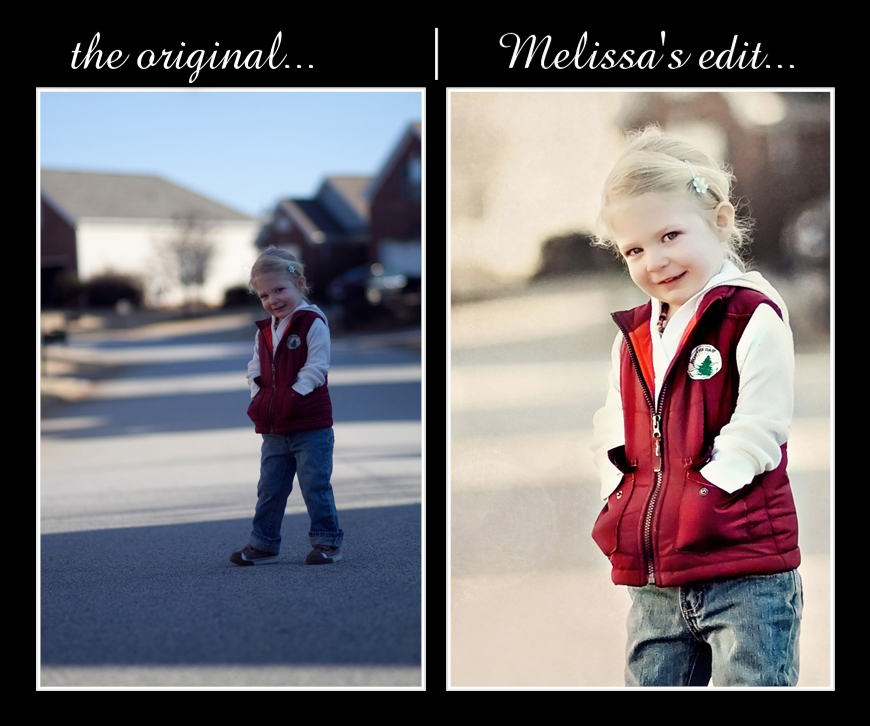
Every Friday i heart faces posts a random photo and you have the opportunity to edit the photo how you would if it were one you took yourself. I look forward to doing these every week (as long as I have time). This week, I'm not going to lie, this image was really hard! I did so much to this image that it would be very confusing to explain everything in detail. To sum it up, I corrected the levels and the white balance by going into Curves. I then added a little fill flash to the face, sharpened and smoothed it in different areas to improve the quality. I used the edge photoshop action by Kubota, added some saturation to make the colors pop a little on the outfit, and finally added a little texture and bokeh to the background.

Check out all the other edits by clicking the logo...



4 comments:
You are right, it was a really difficult image to work with, but you did a great job!
Very nice. Loved how you cleaned up and brightened her face.
Wow! What a difference! You did an amazing edit!
Great edit. Nice and clean. Great job lightening her face.
Post a Comment